A recipe box for iPhone and iPad. Scan Grandma’s cards, save from any site, cook step by step, plan the week and shop from one list. No account, no ads, nothing to sign up for.
A quick look at saving and tidying recipes, the recipe book, Discover, planning, sides, wine and cooking, narrated, with captions.
The stained card in Grandma’s handwriting. The cookbook page with butter on it. The link someone texted you. Ovenbird keeps the recipes your family actually cooks, together, on your devices and in your own iCloud.
Bring them in
Scan a card. Keep it forever.
Point your camera at a recipe card or a cookbook page. Ovenbird reads it right on your iPhone and shows you what it couldn’t make out, instead of guessing. With Apple Intelligence, the lines are sorted into ingredients and steps for you.
A family recipe card, ready to cook. Real recording, sped up.
Save from any site
Tap Share in Safari, Instagram, TikTok or YouTube, or paste a link. You get the recipe, not the life story and the pop-ups.
Move your whole library
Photos, categories, ratings, favorites and notes come along.
PaprikaMelaSpreadsheets (CSV)
Discover something new
Browse hundreds of dishes by category and cuisine and add the ones that look good to your own box. Once you’ve saved a few recipes, Discover picks dishes for what you cook. Say yes, and it brings in new recipes from the sites you save from, with a row for the holiday coming up.
Tidy up
Messy in. Tidy out.
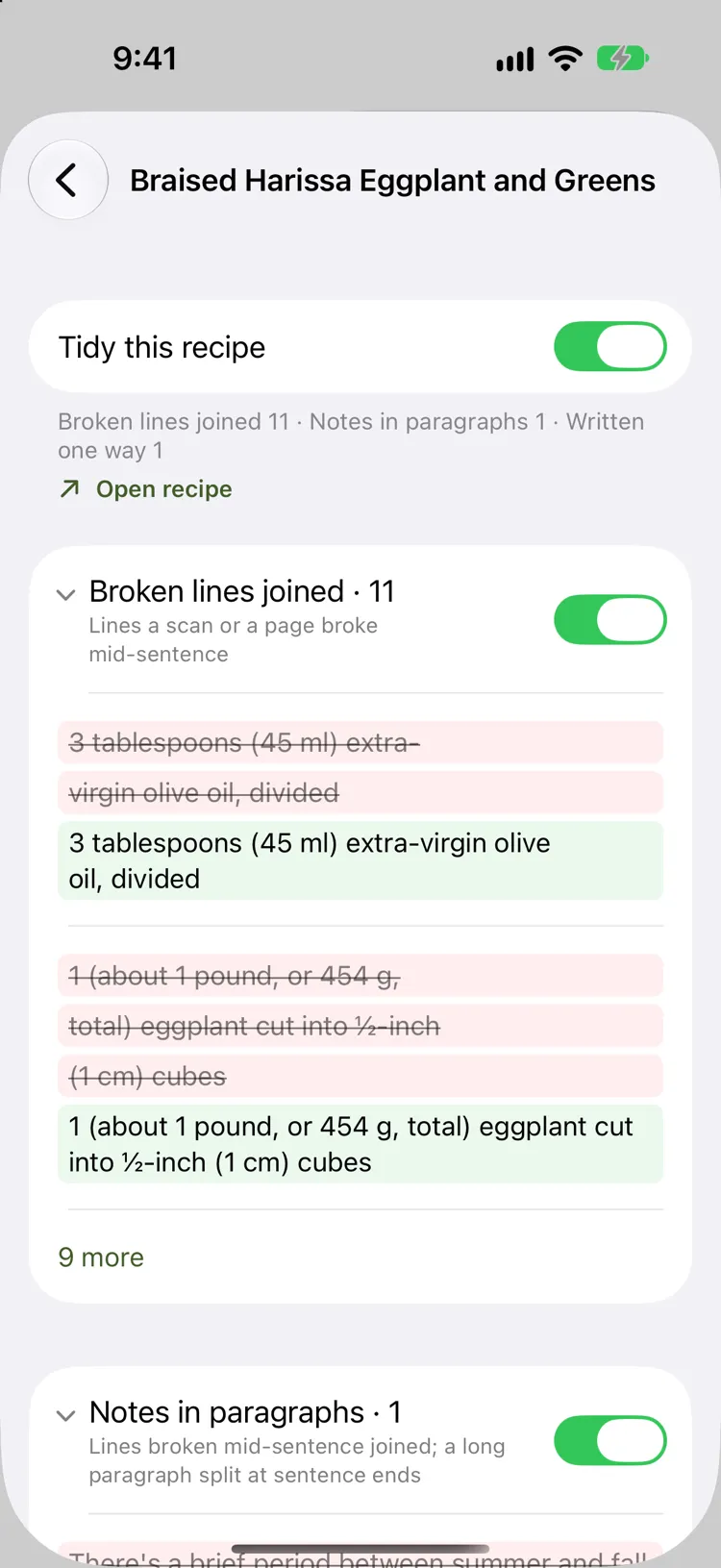
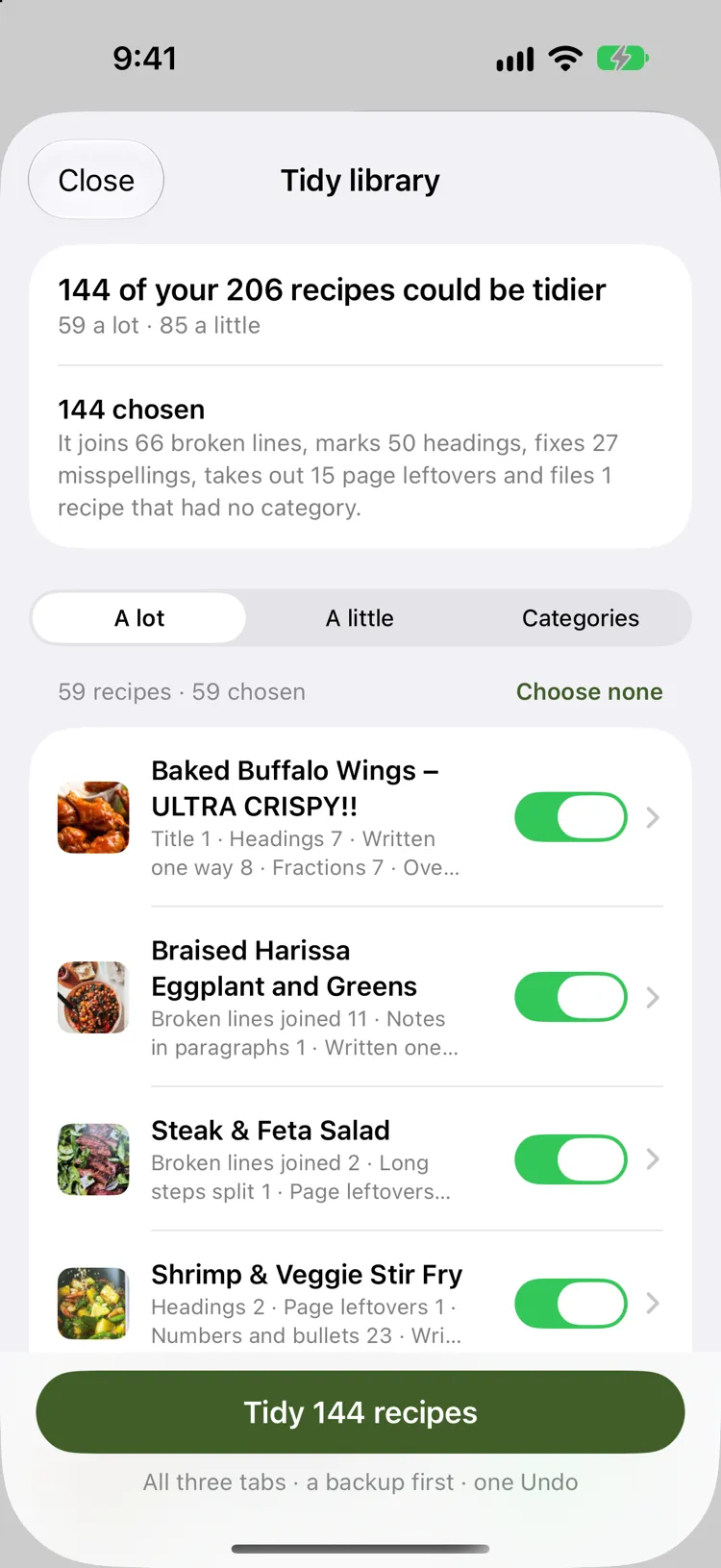
Recipes arrive with lines a scan broke, headings in capitals, a web page’s leftovers and the odd typo. Tidy up puts them right in a tap and shows every change before anything happens. It never rewrites your words.
One recipe, in a tapBroken lines joined, headings marked, page leftovers out, amounts written one way. Switch off any change, and Undo puts back only what it changed.
Your whole library, with ProEvery recipe that could be tidier, worst first, to look over, and a category for any without one. A backup first, and one Undo for all of it.
And select many recipes at once to add or take off a category or a tag, or rename and merge them across your whole library from one place.
✦ New in 1.7: Recipe book
Your recipes, as a book.
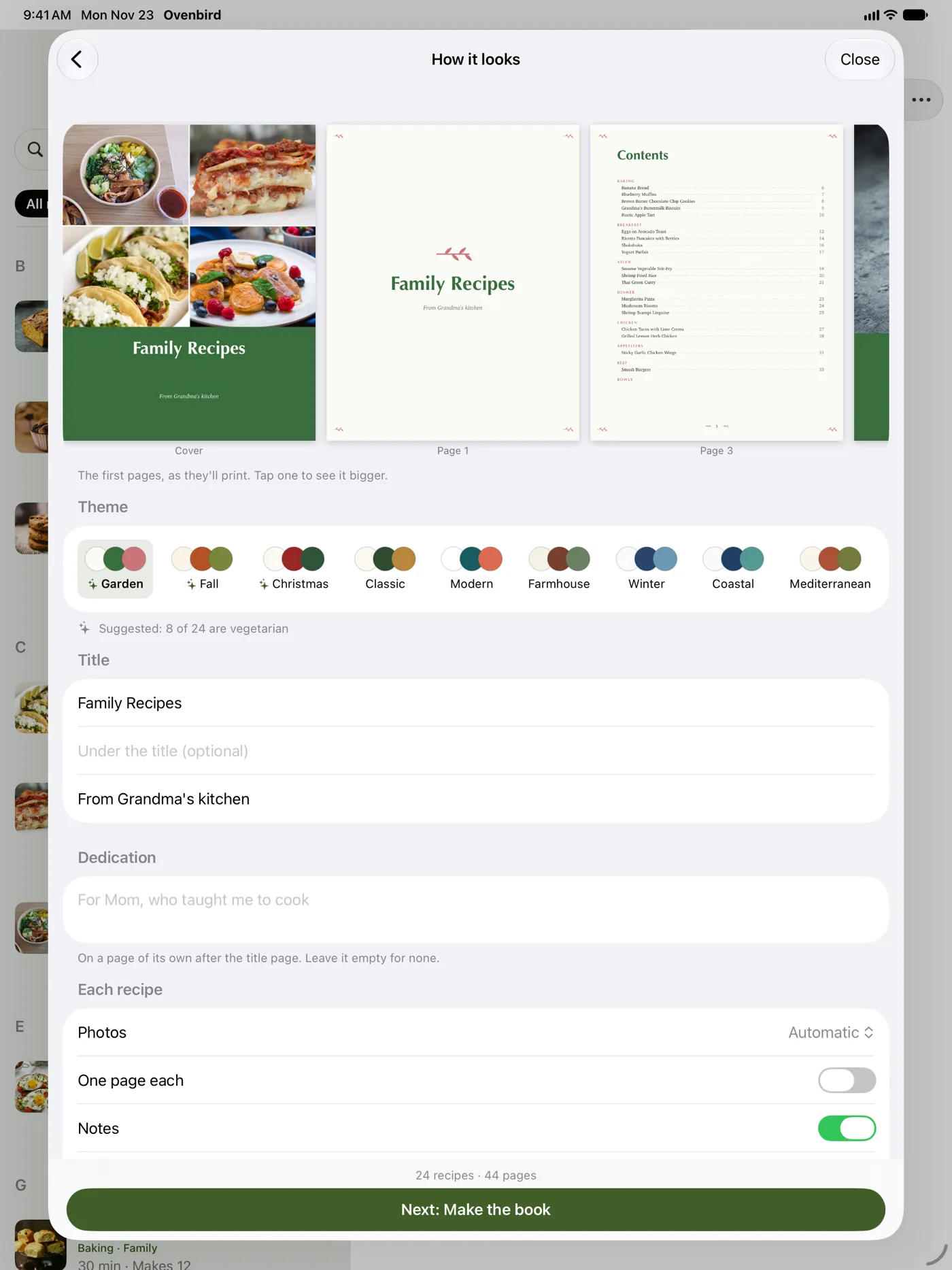
Your whole library, a few categories, or the favorites everyone asks for, laid out like a cookbook: a cover from your own photos, contents, and each recipe on its page. Read it on an iPad, print it at home, or order printed copies from Blurb, Lulu and other book printers.
A look for every bookEleven themes, suggested from what’s in it: Coastal for seafood, Garden for vegetarian, and Fall, Winter and Christmas with art of their own.
Ready for the printerPages and cover made to each printer’s own sizes, bleed and spine, so the upload just works.
Photos that print wellEach photo checked for sharpness, across the top of its recipe or on the page facing it, as a cookbook has them.
With Ovenbird Pro. Without it, make your whole book to look through, marked Preview.
Cook mode
No surprises at step four.
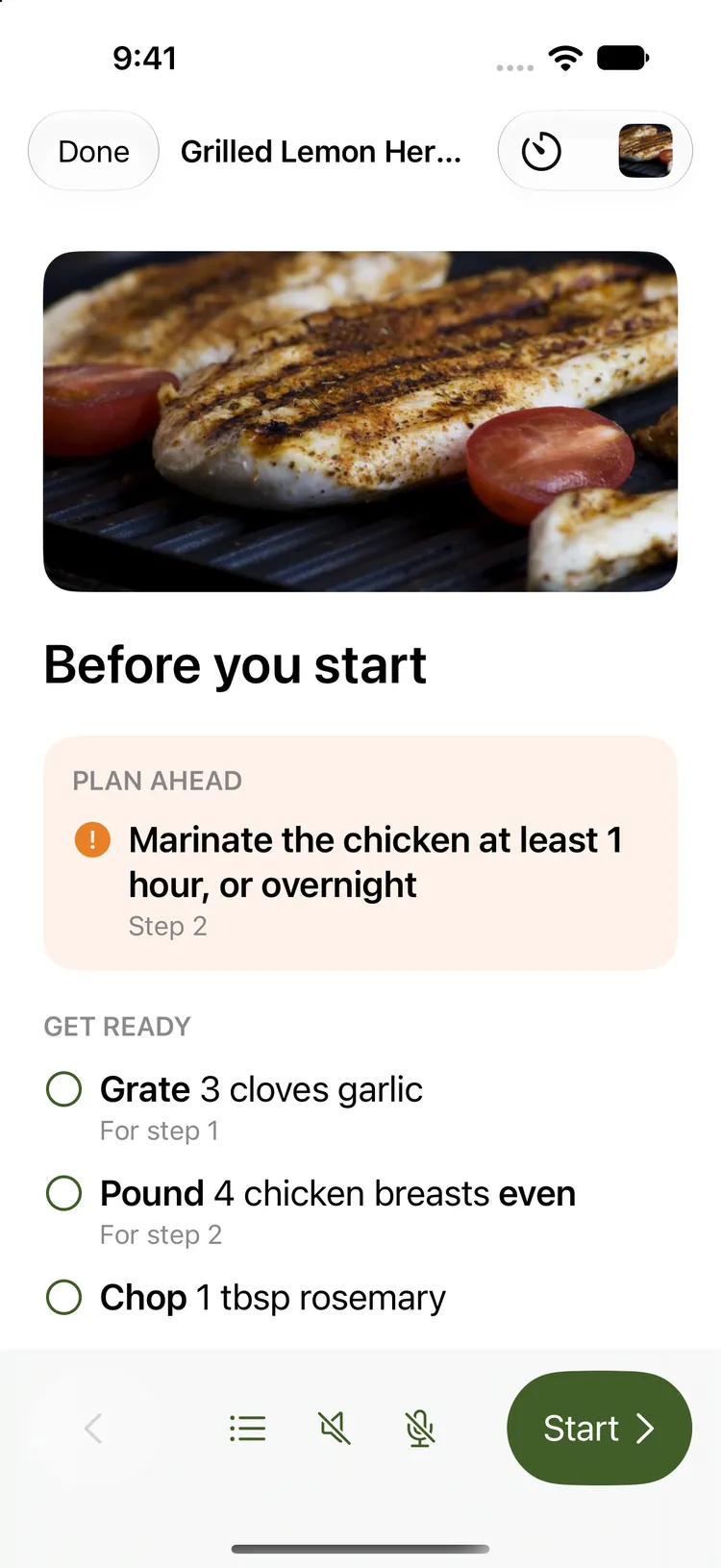
Before the stove goes on, Ovenbird reads the recipe for you: what needs a head start, like marinating overnight, and what to chop, in the order you’ll need it. Then one step at a time, with exactly what goes in and timers that know what they’re for.
Before you startWaits to plan around and the oven to heat, then a prep list in step order: grate the garlic for step 1, pound the chicken for step 2.
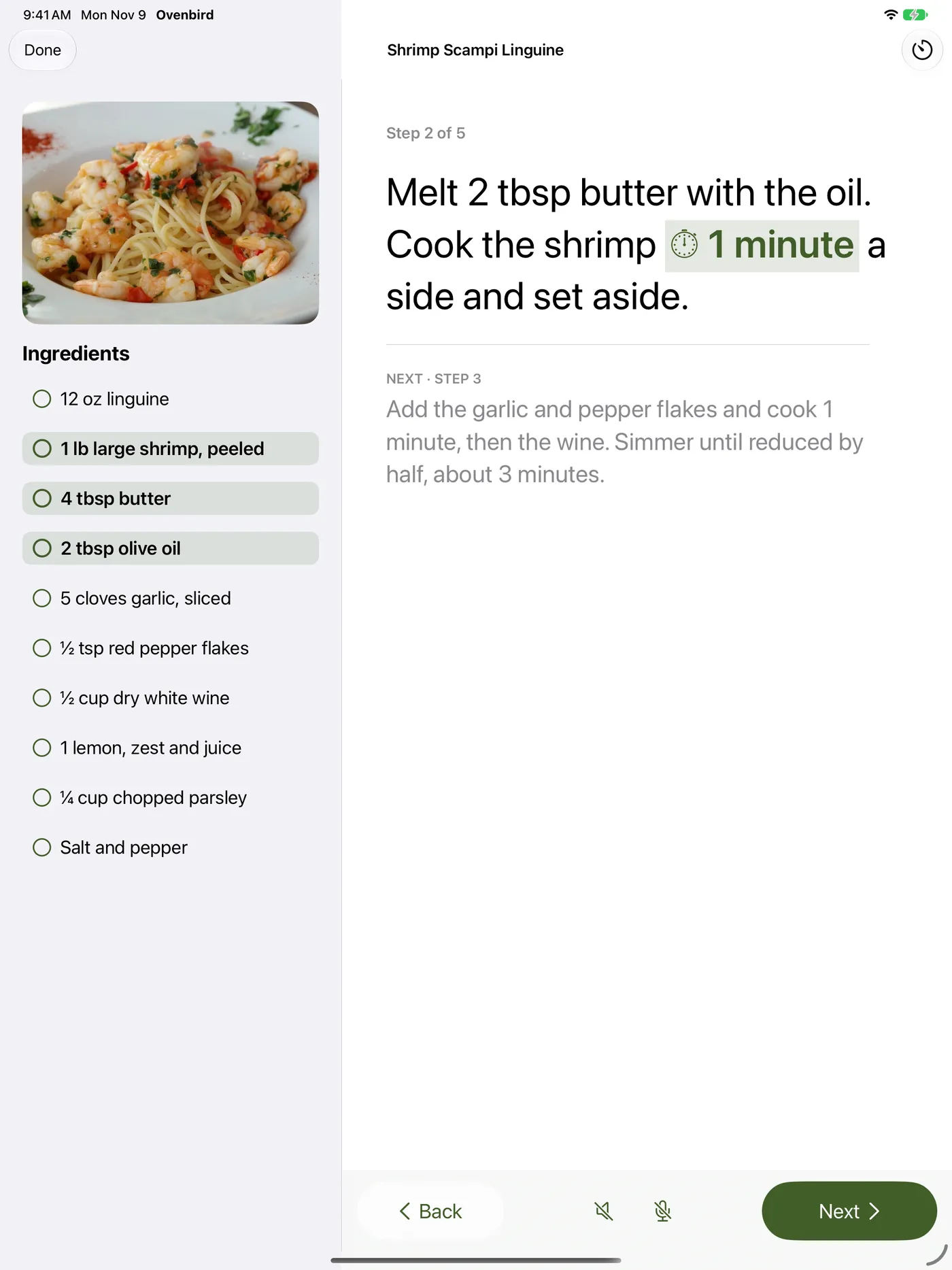
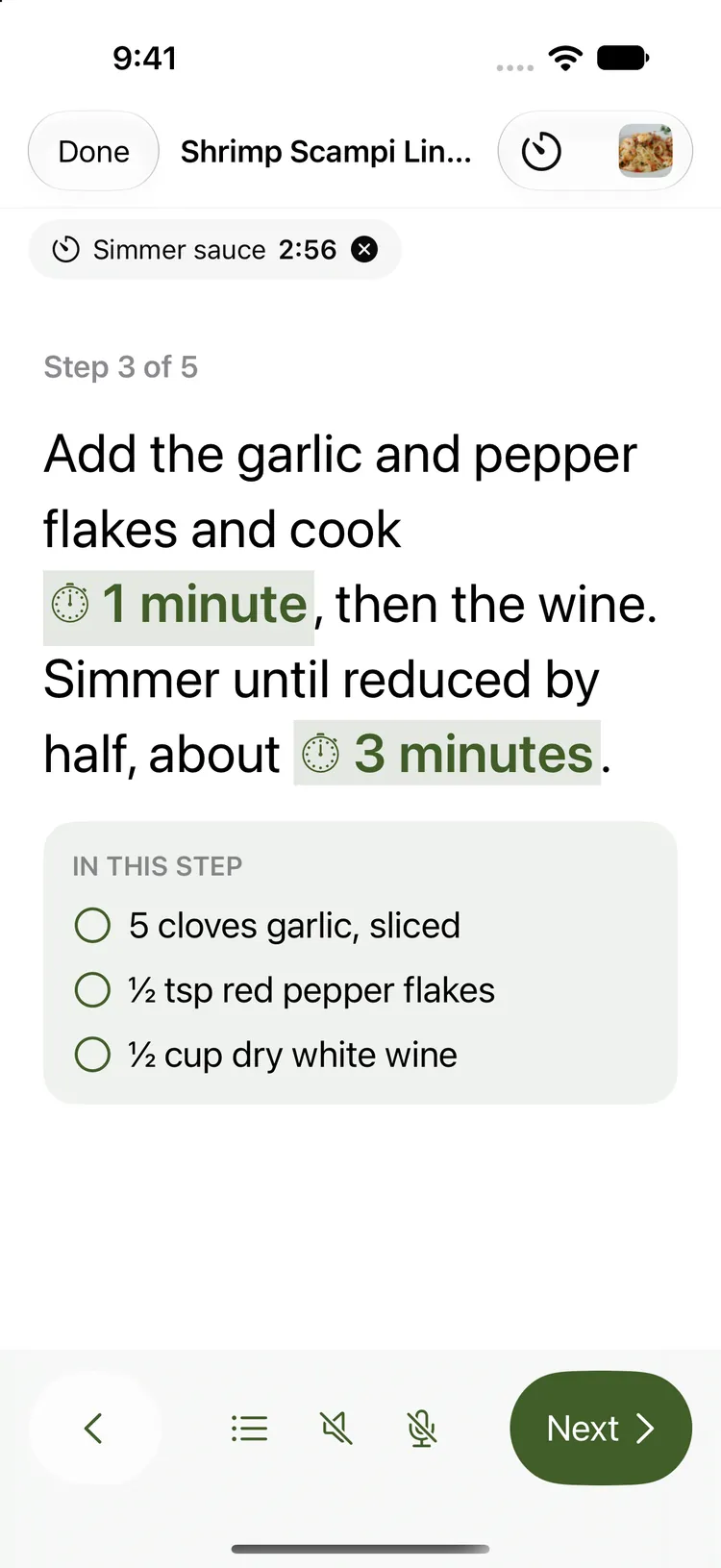
What goes in, every stepEach step lists its ingredients, scaled, to tick off. On iPad the photo and the whole list stay beside the steps, with the next one underneath.
Hands-freeSay “next”, “back”, “step 3” or “set a timer for 5 minutes”. Steps can be read aloud in the most natural voice on your device. All heard on the device.
Timers that know what they’re for.
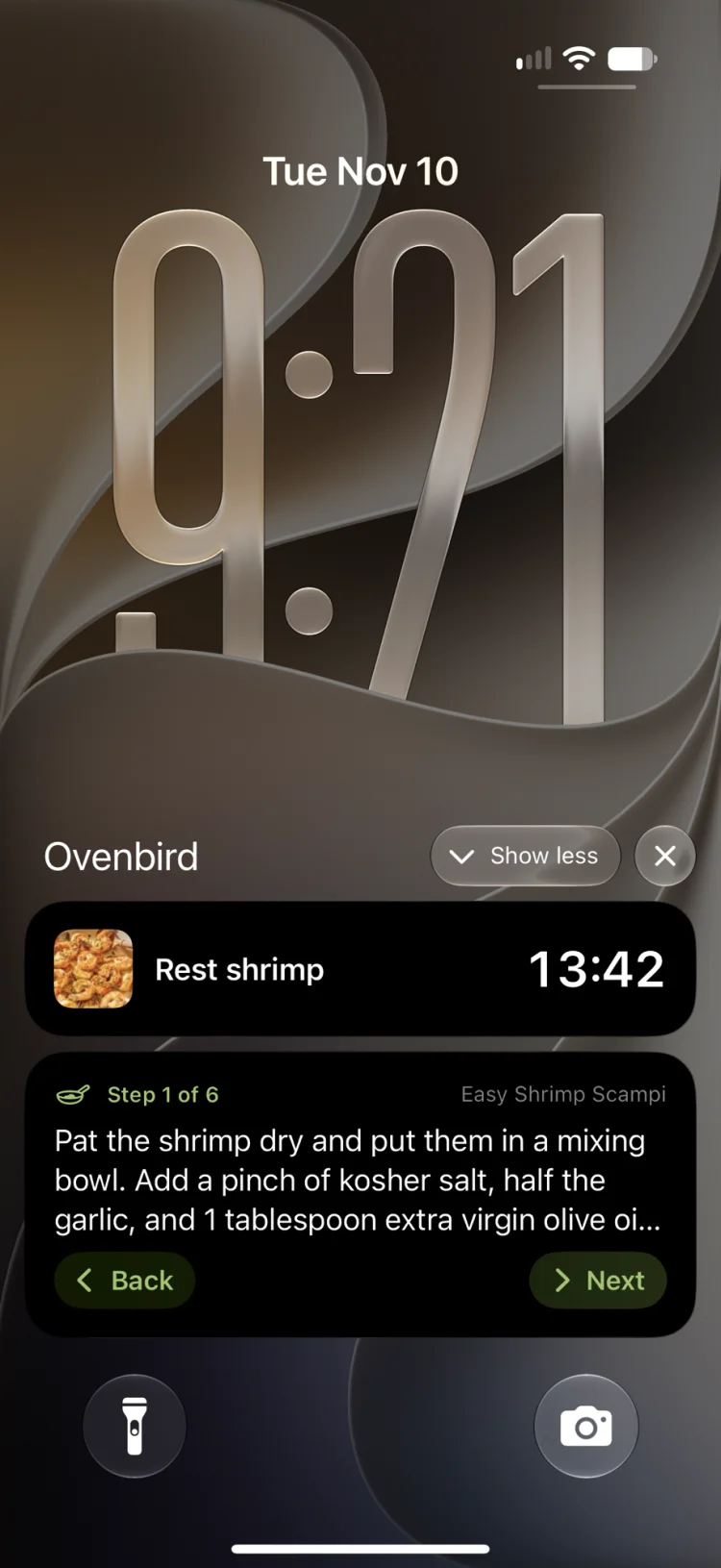
Tap a time in any step. “Simmer sauce” counts down on the Lock Screen and in the Dynamic Island, rings like the Clock app’s, even on silent, and opens right back to the recipe.
Your step waits right below it, with Back and Next, so a floury thumb never has to unlock the phone.
From your fridge
Cook with what you have.
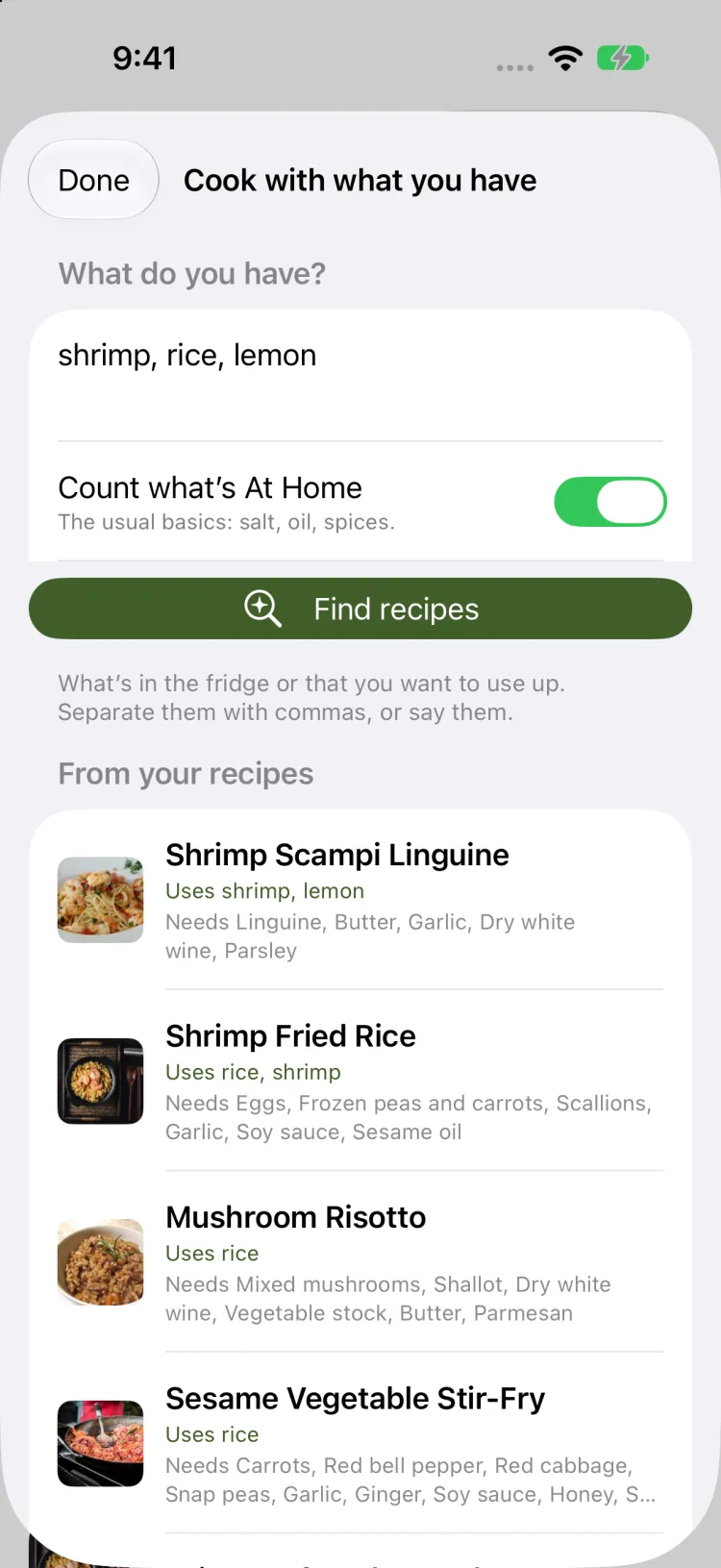
Say what you’ve got. Ovenbird finds your recipes that use it, tells you what else you’d need, and counts the basics you already keep at home.
shrimpricelemon
From your recipes
The main thing first: shrimp on hand means shrimp dishes, not a chicken recipe with a squeeze of lemon.
Something new, by Apple Intelligence
A recipe written on your iPhone from just what you listed, with anything extra called out.
Or search the web
Right inside Ovenbird. Land on a recipe and save it with one tap.
With dinner
A side for tonight. And the wine to pour.
Open a main and Ovenbird suggests what goes with it: one of your own sides, or a simple one that needs no recipe, put on the plan beside dinner in a tap. And two or three wines, with why each suits the dish, and every bottle you’ve opened remembered from its label.
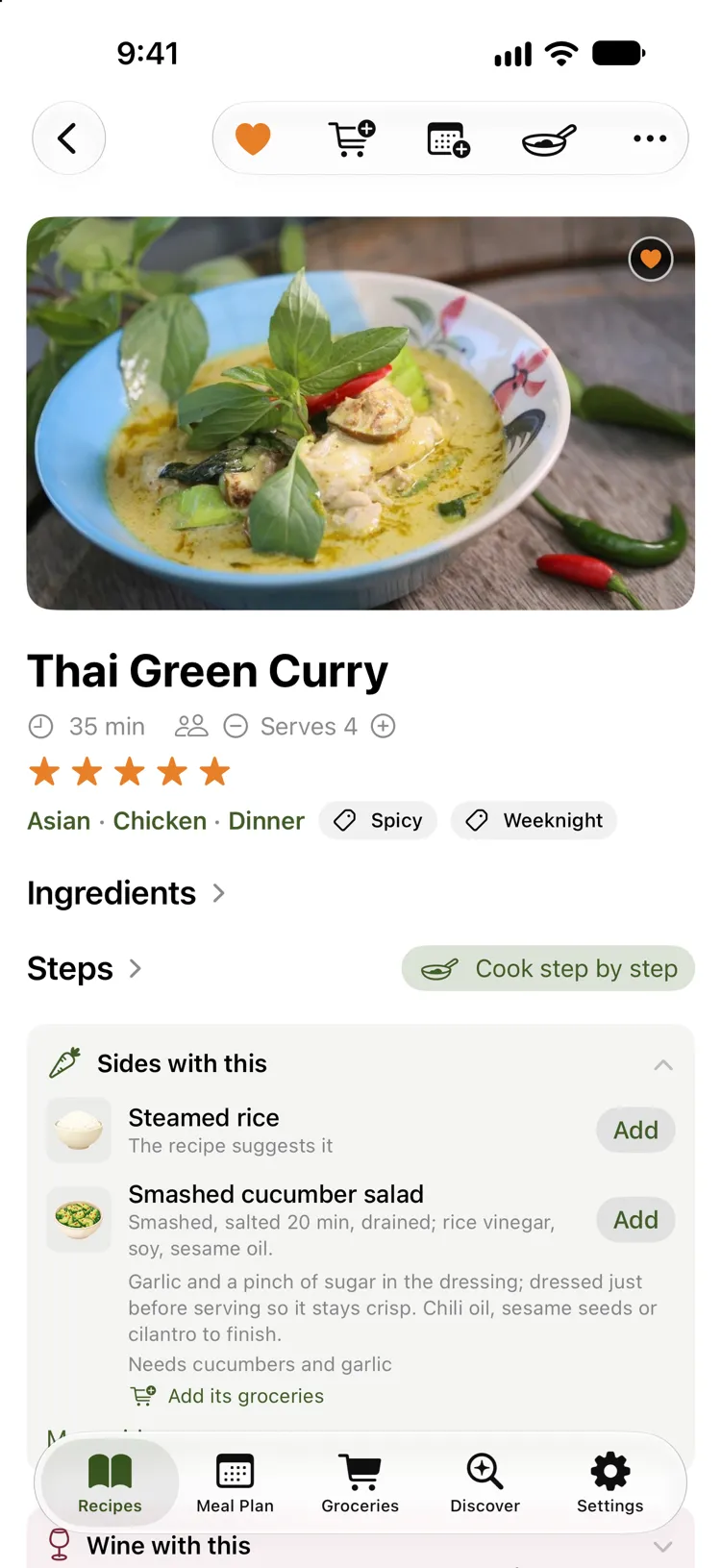
Sides with thisThe recipe’s own suggestion, one of yours, then simple sides each cuisine knows, with how they’re made. Add puts one on the plan beside the main.
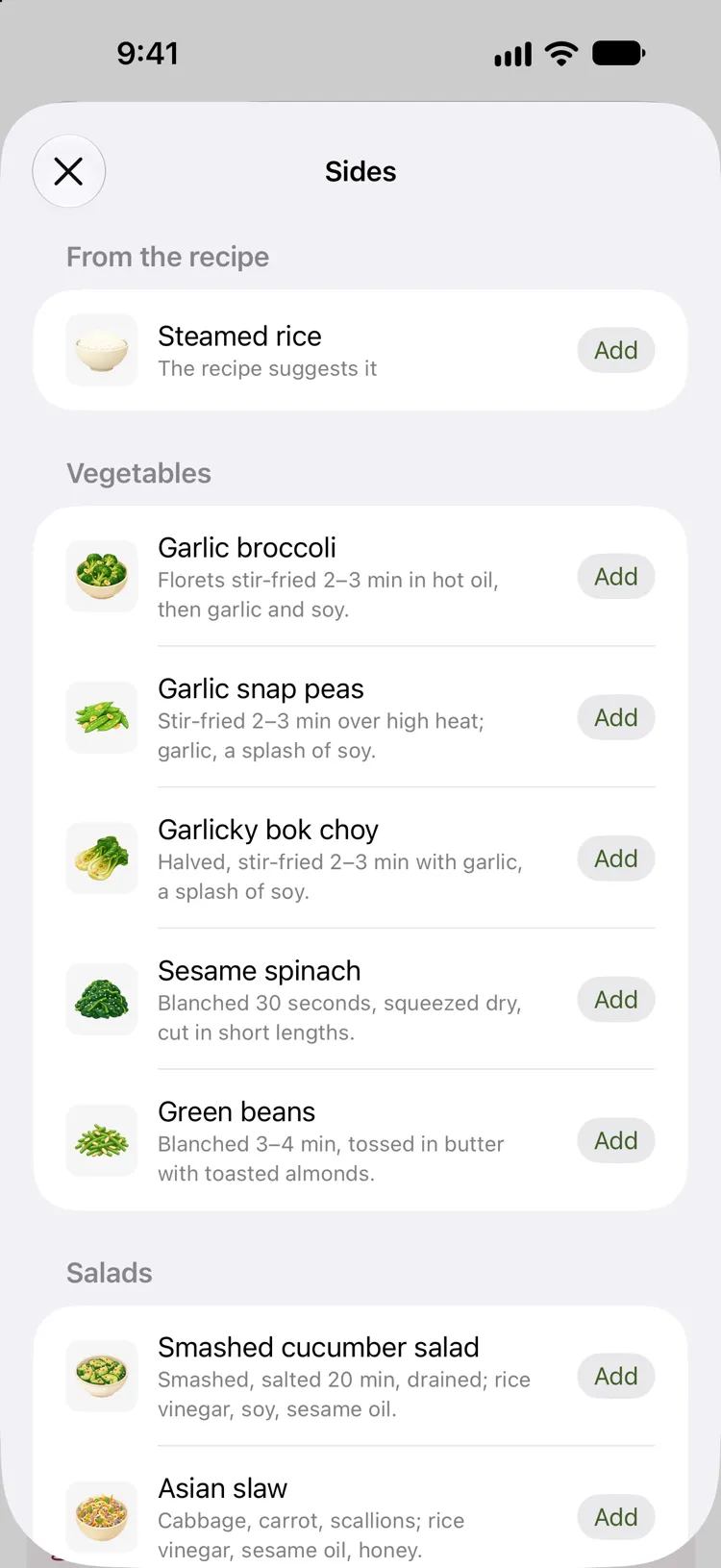
More sidesThe whole list by kind, each with its picture and a line on how it’s made. Or look for ideas on the web and save one in a tap.
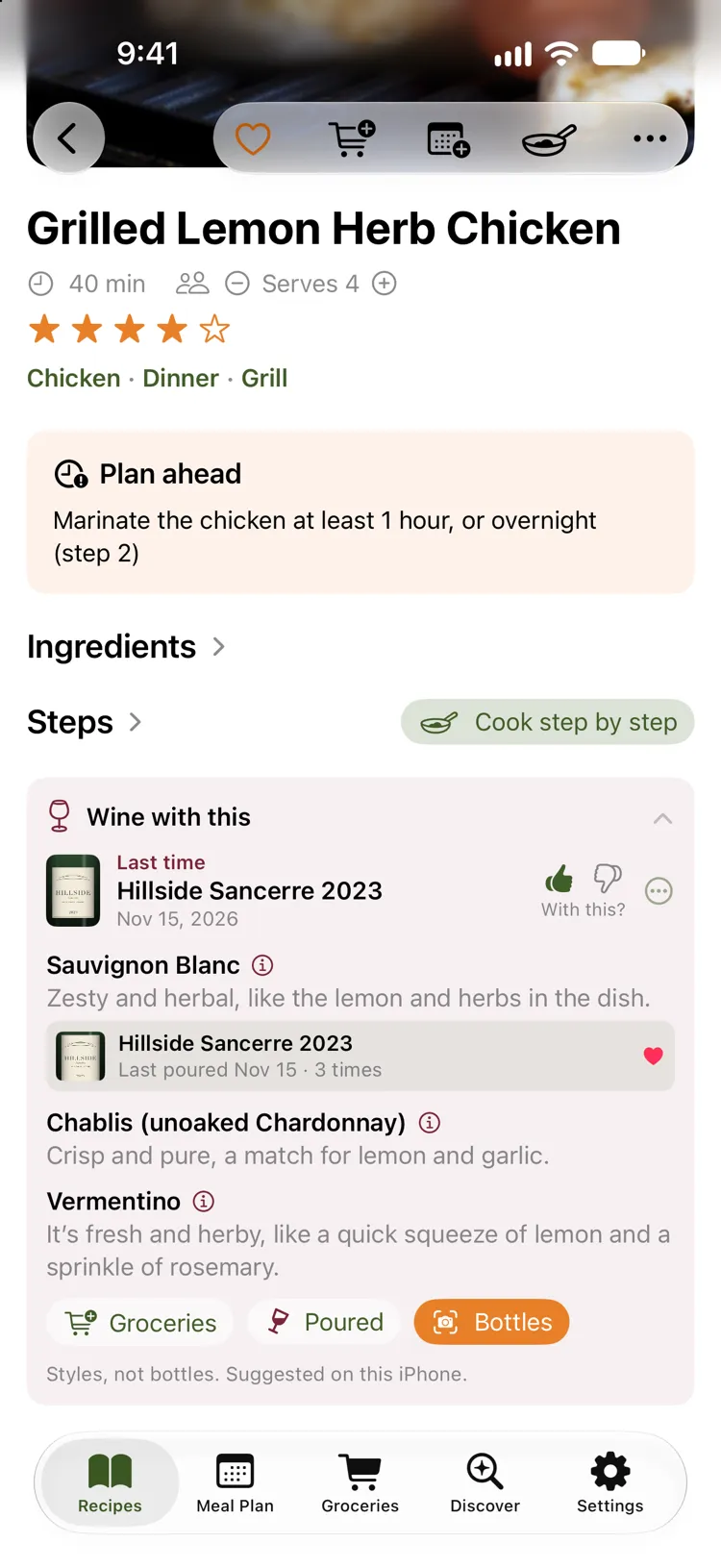
Why this wineStyles, not brands, each with a reason about the dish, and your own bottles first. Wine is off until you’d like it.
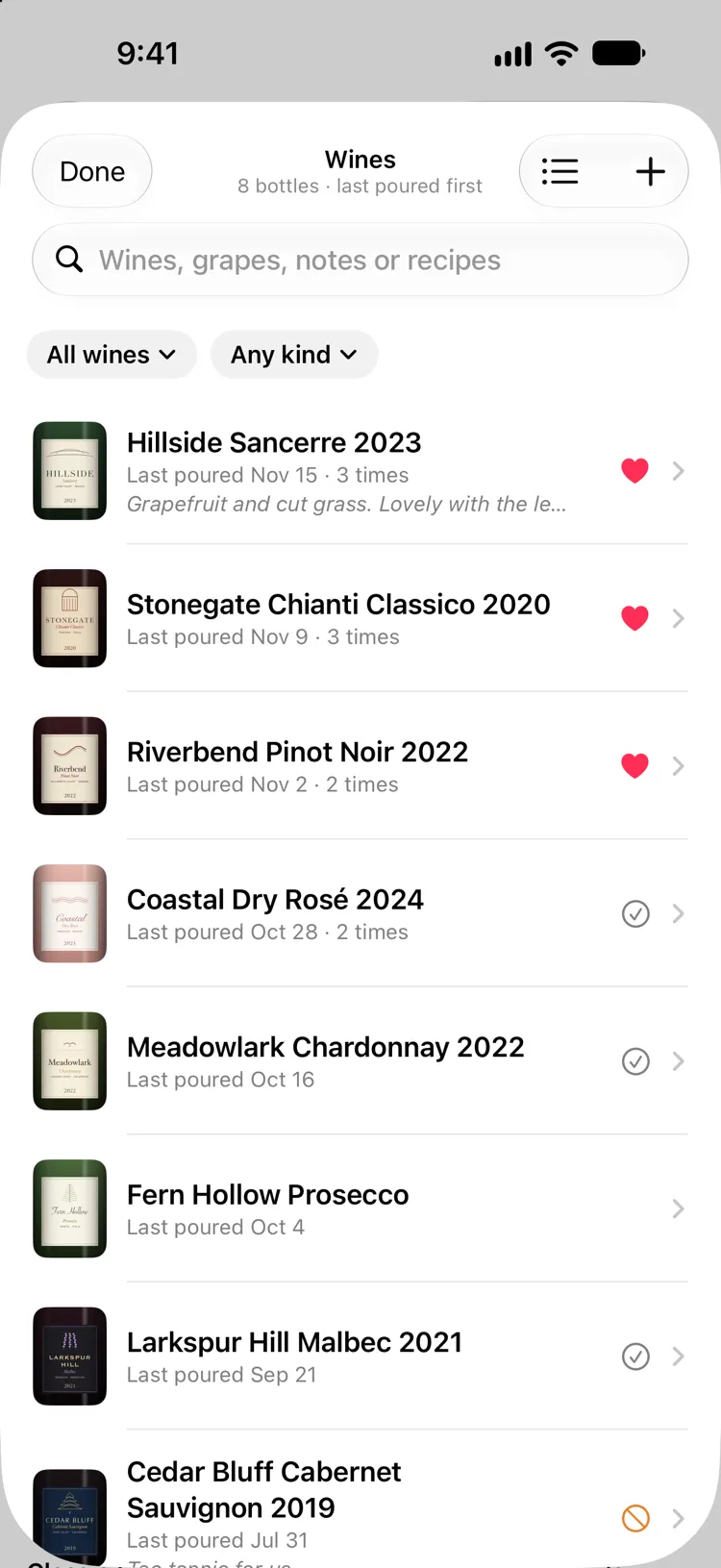
Every bottle, rememberedRead from its labels on your iPhone, last poured first, with how you liked it and what it went with.
See tonight’s side and wine on the Meal Plan, let Fill the week pick a side for each night, or ask Siri what goes with dinner.
Plan & shop
Plan the week. Shop from one list.
Put dinners on days, type “Tacos” or “Leftovers”, or let Ovenbird fill the week. Then make the list from the whole week: ingredients added up and grouped by section, and the things you keep at home left off. Keep it in step with a Reminders list if you like, and the plan in your calendar.
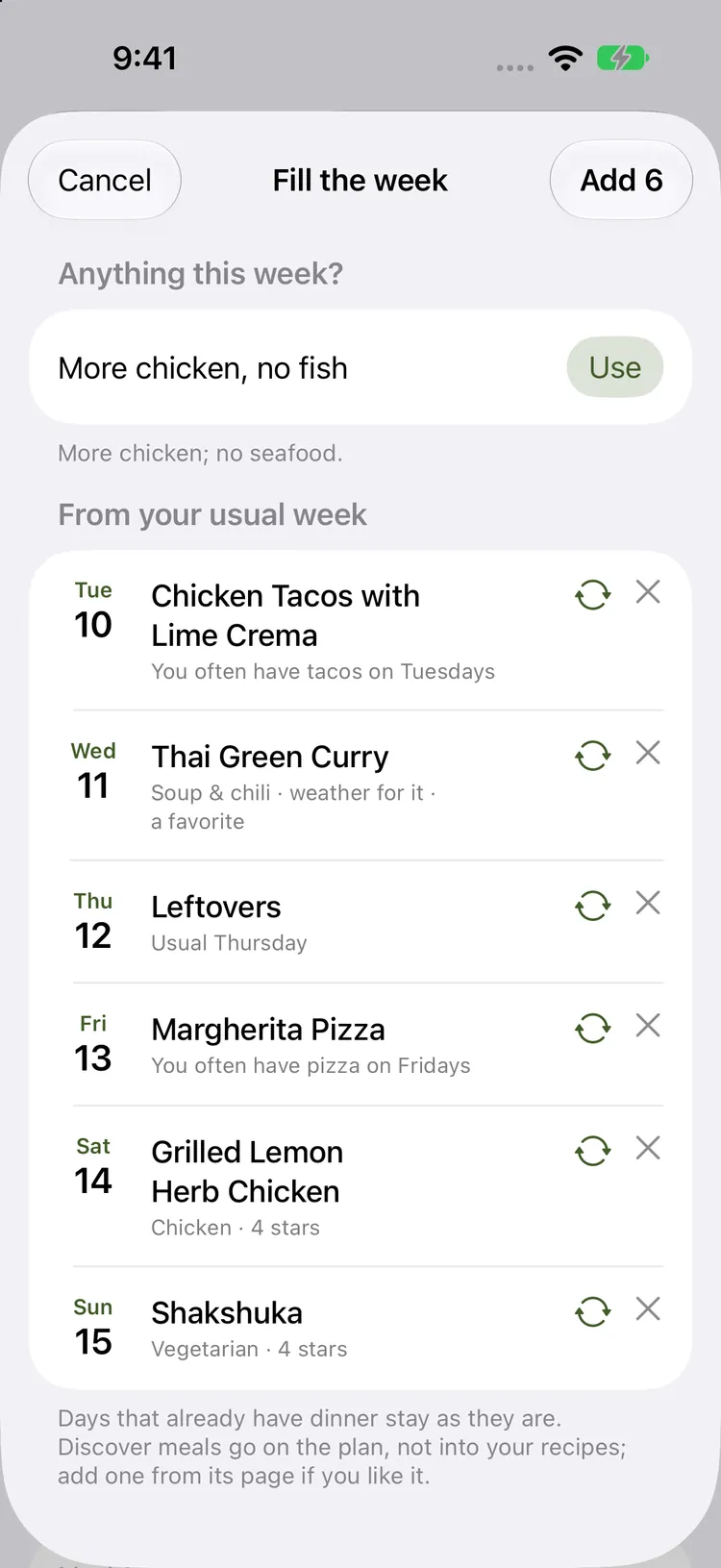
Fill the weekOne tap suggests dinners for the empty days from how you usually eat: tacos on Tuesdays, pizza on Fridays. Ask for “more chicken, no fish” and it plans around that. Swap any night you don’t fancy.
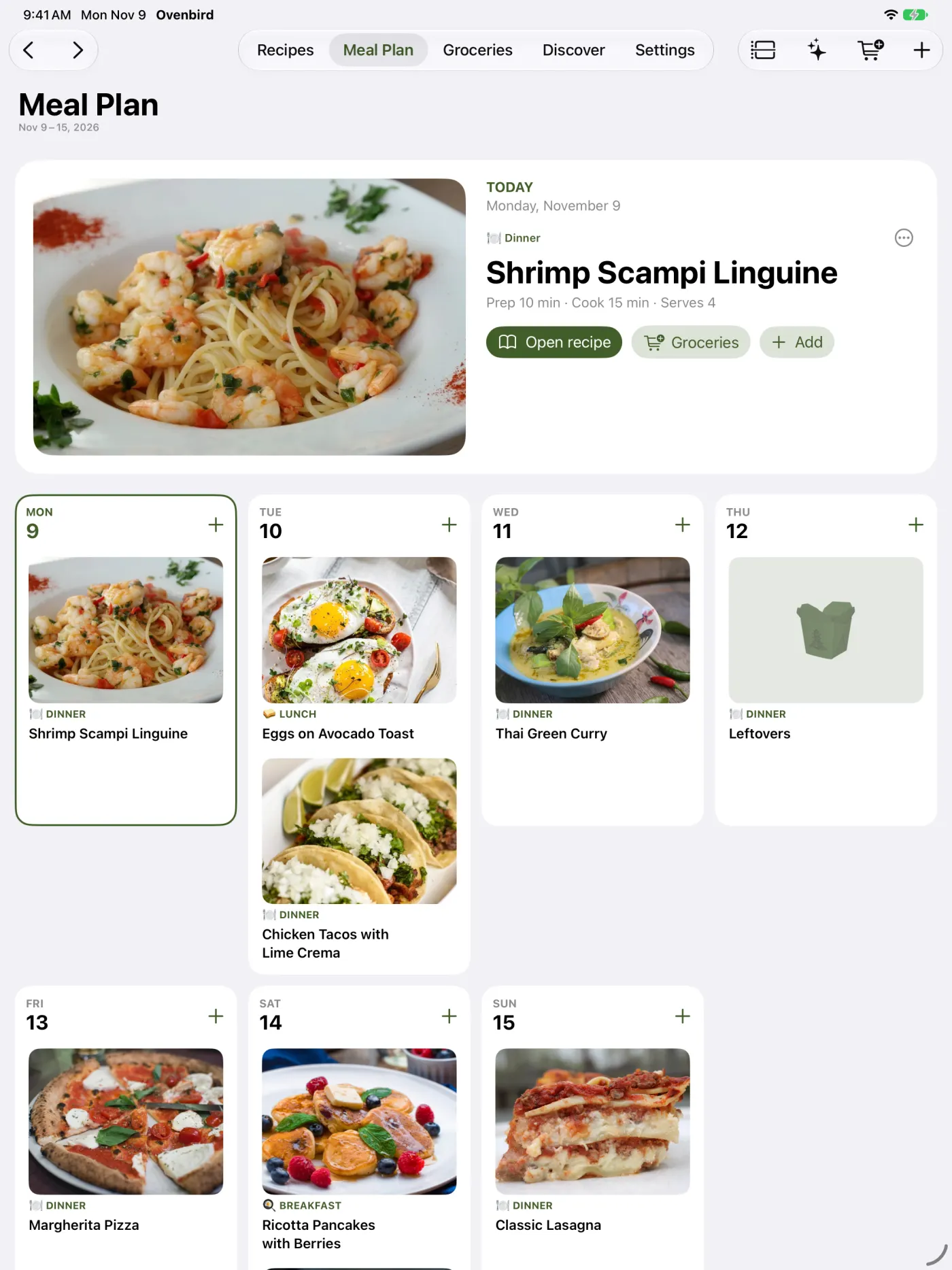
Tonight, up frontToday’s dinner with its photo, the week laid out after it, and ideas from your favorites when nothing’s planned.
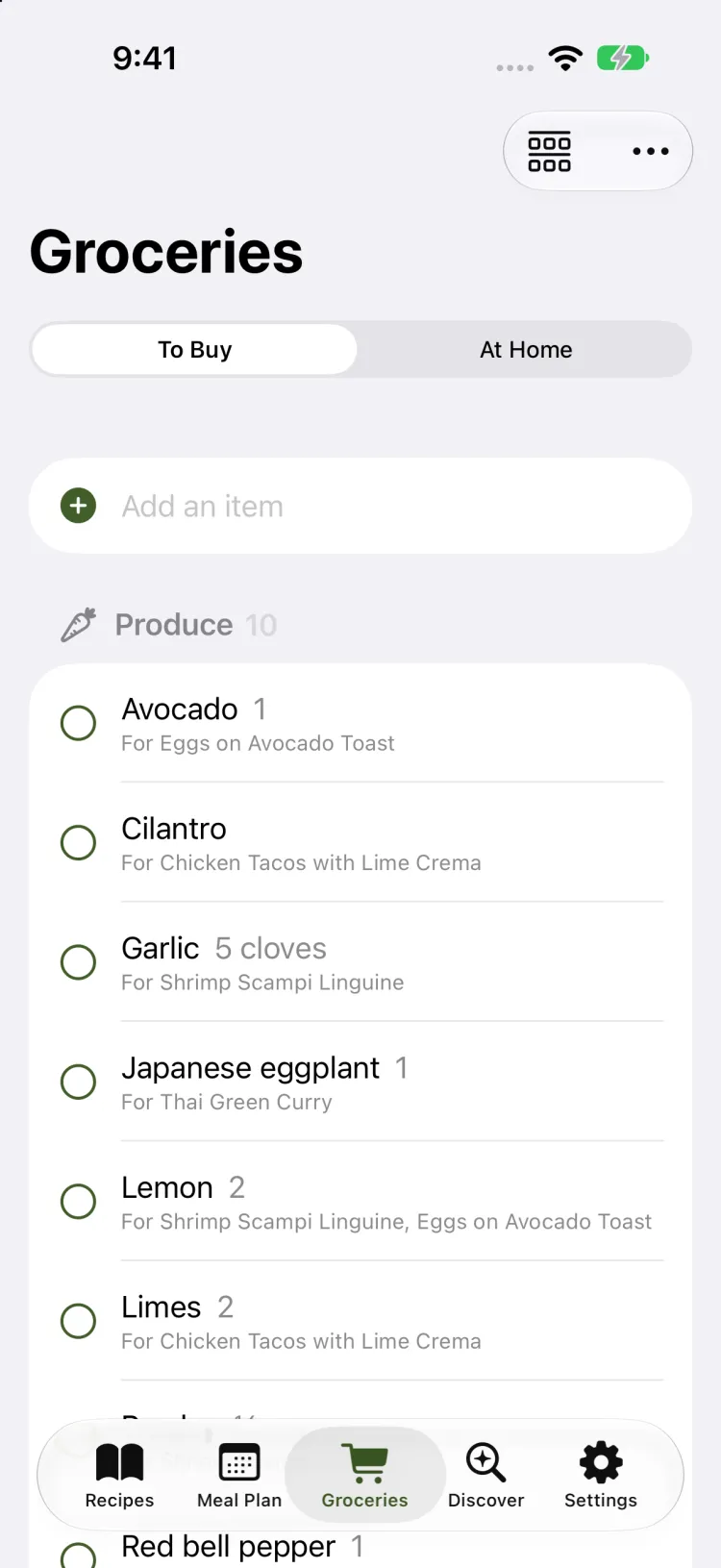
Grouped by sectionProduce, meat, dairy, pantry, each item saying what it’s for. Move something and it remembers where it goes. Sync it with a Reminders list, and anyone you share that list with sees it, Siri too.
Start it in time. A dinner that marinates, chills or slow-cooks gets a heads-up when it’s time to start, counted back from when you eat.
Cooking for a crowd? Day shows one day’s meals by kind, breakfast to dessert, each with its photo and Cook. And share the week with anyone, Ovenbird or not: as a message, an email with photos and recipe links, or printed for the fridge.
iPhone, iPad, iPhone Duo and Apple Watch
In your hand. On the counter.
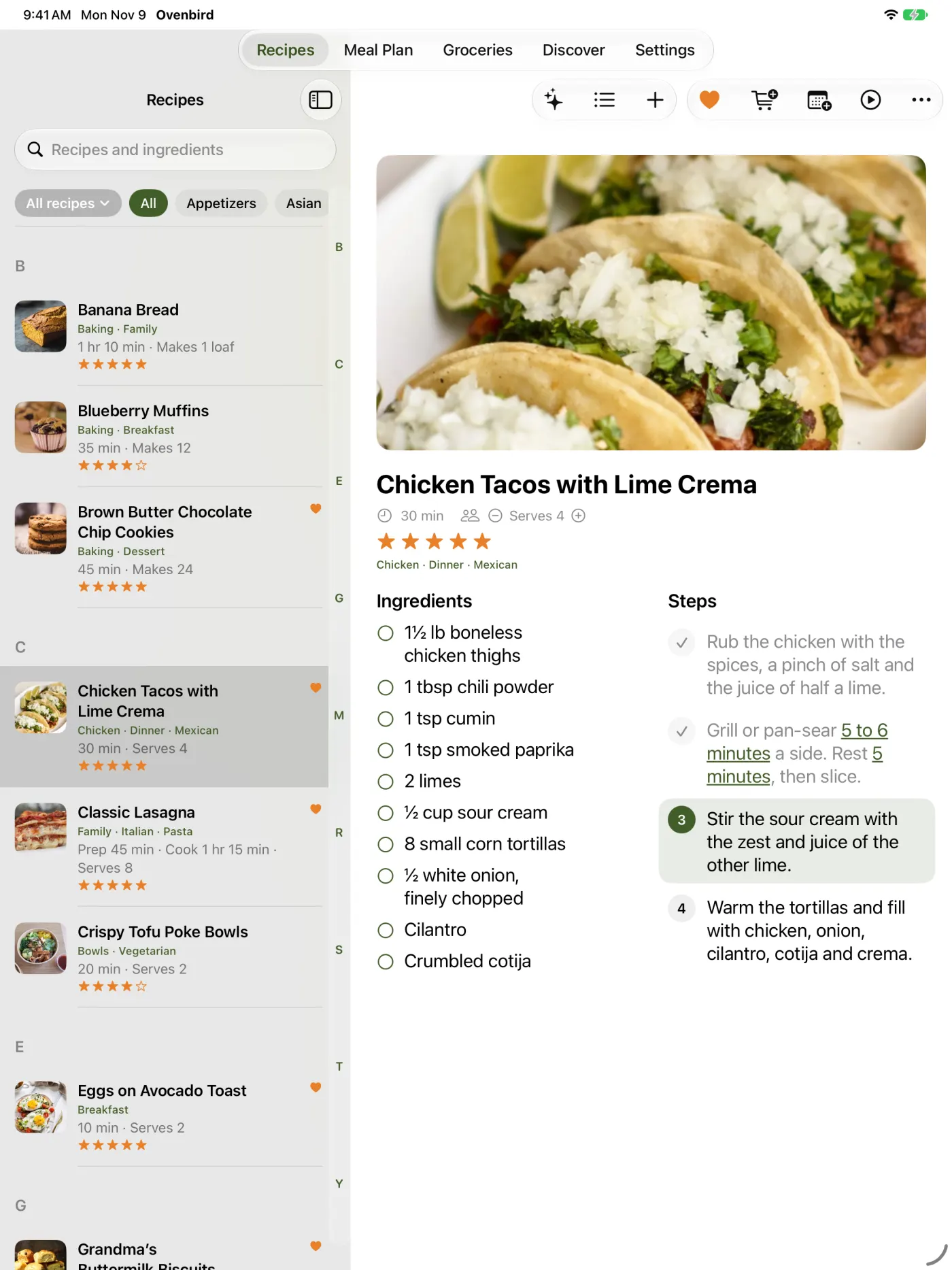
Ovenbird is made for each, not stretched from one to the other. Plan on the couch, shop with your iPhone, cook from your iPad.
On iPhone
Wherever you are.
Scan a card with the camera, or save from Safari’s Share button
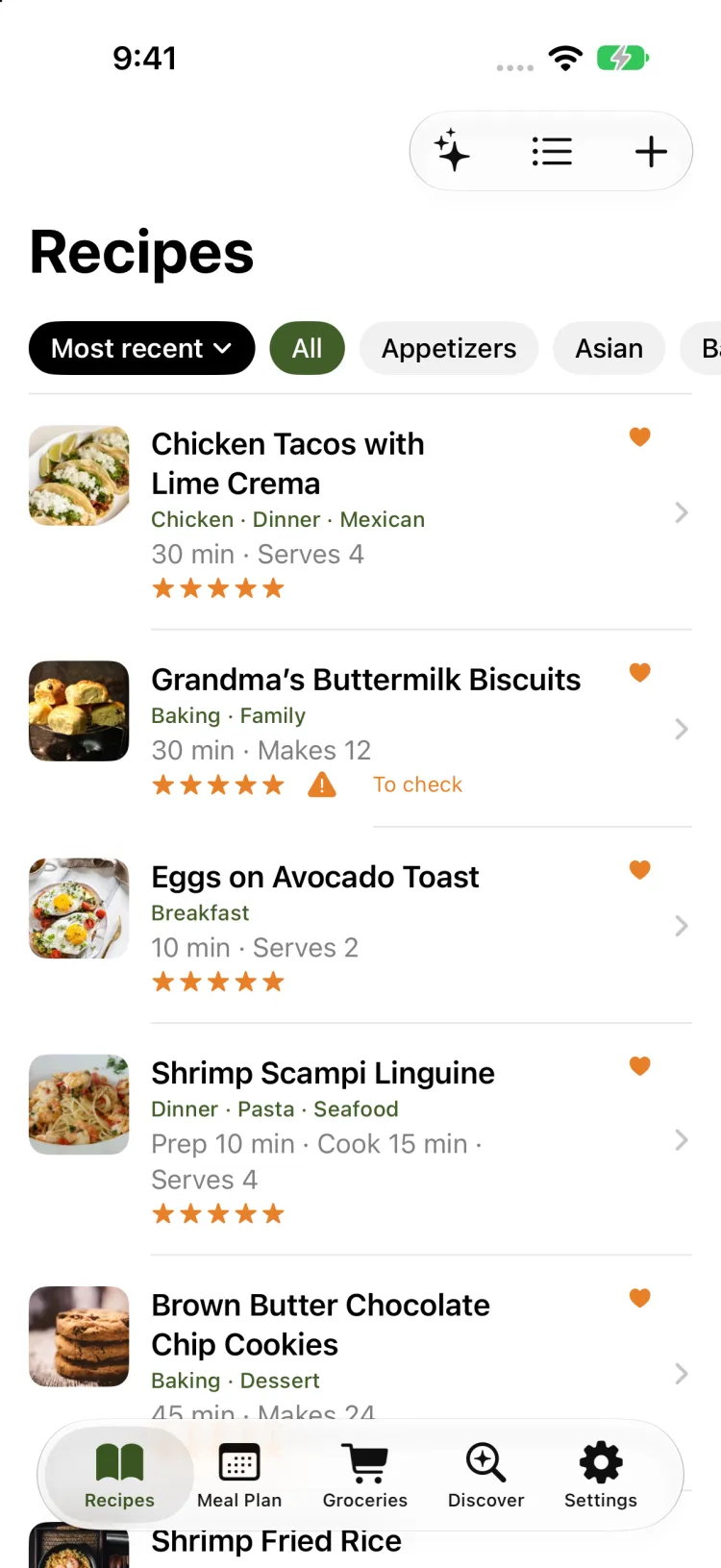
Photo cards, a grid, or a quick list to scroll
The grocery list in your hand, grouped by section
Widgets, Siri, and your step and timers on the Lock Screen
Pairs with Apple Watch for cooking and shopping
On iPad
Made for the counter.
Your recipes beside the one you’re cooking
Cook mode with the photo and ingredients beside each step, and the next step in view
Steps big enough to read from the stove, and the screen stays on
On iPhone Duo
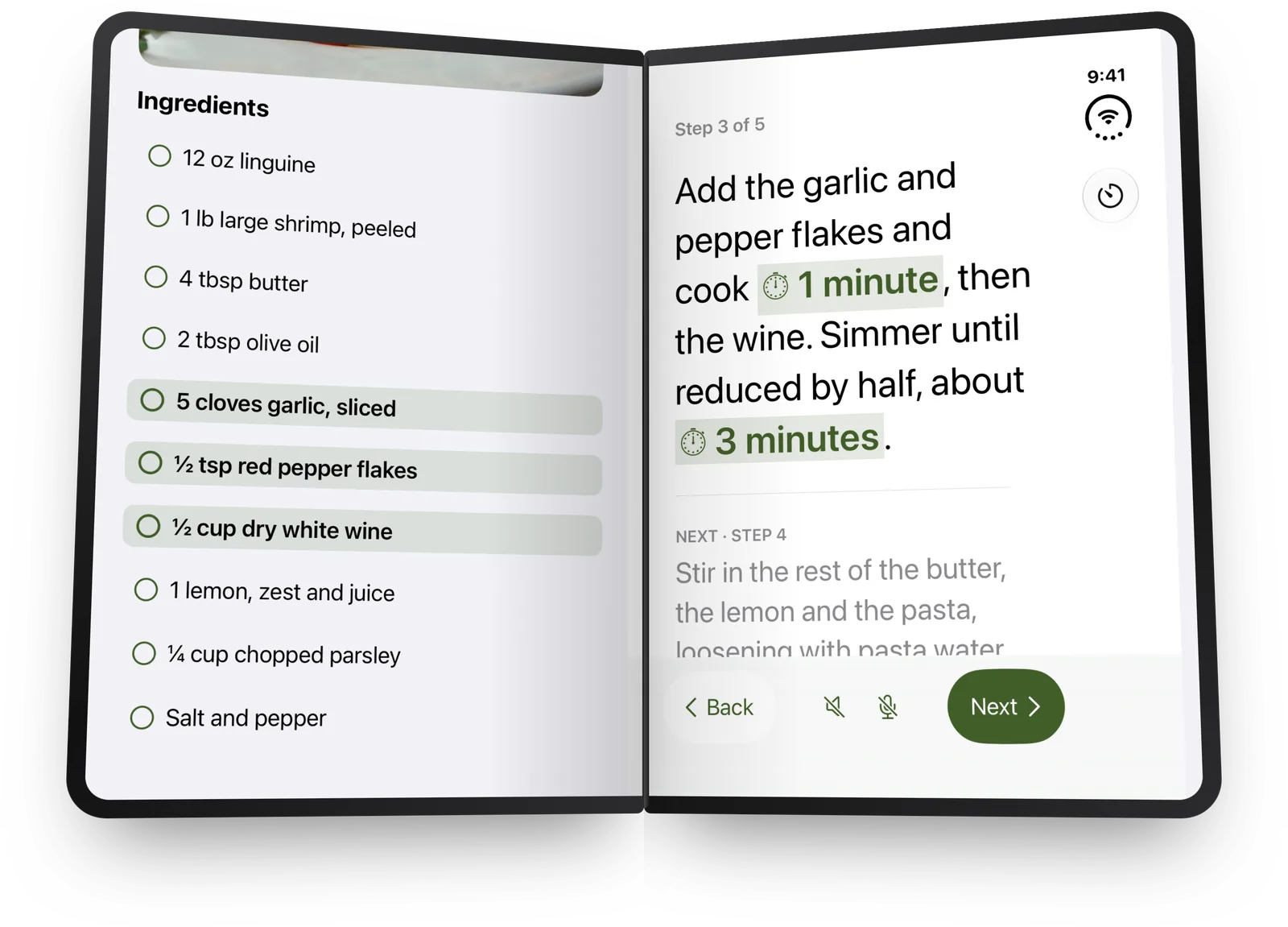
Opens like a recipe book.
Your recipes on one page, the open recipe on the other
Cook mode’s ingredients beside the step
On Apple Watch
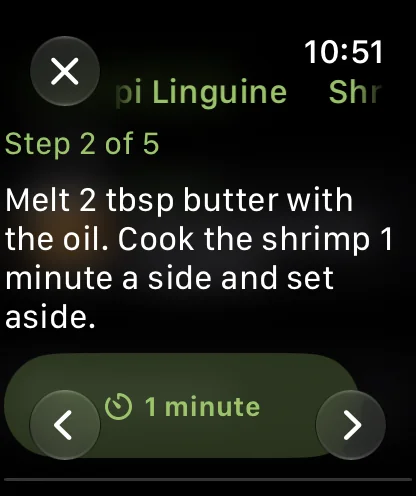
On your wrist.
The step you’re on, with Back and Next and timers
Today’s meals and the grocery list to tick off
Siri & widgets
Dinner, at a glance.
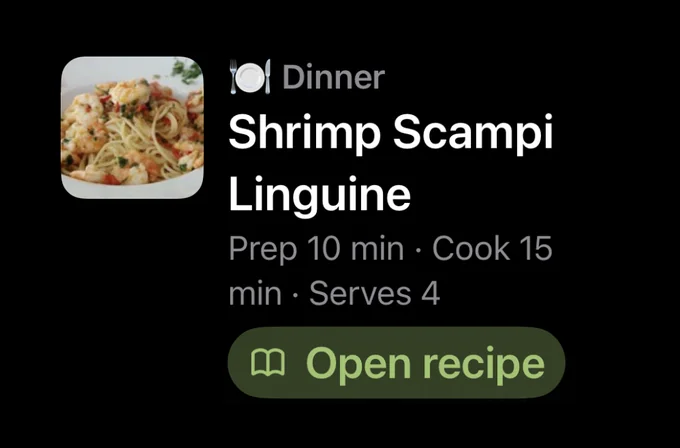
“What’s for dinner in Ovenbird?” answered with tonight’s recipe
Tonight and the list on your Home Screen; your step and timers on the Lock Screen
Same recipes, plan and list on all of them, through your own iCloud.
Apple Intelligence & privacy
Smart where it helps. Private where it counts.
Ovenbird hands the fiddly parts to Apple Intelligence, right on your iPhone or iPad. Nothing goes to a server, not even ours.
Reads your cards
Handwritten cards and cookbook pages become ingredients and steps, filed in the right category, with unclear lines flagged to check.
Writes something new
List what’s in the fridge and get a recipe made from it, with anything extra it needs called out.
Understands what you ask
“More chicken, no fish, kids want tacos” shapes the dinners Fill the week suggests.
Names your timers
“Simmer sauce”, not “Step 3”, on the Lock Screen and your watch, worked out from the step.
Says why it’s for you
Dishes picked for you in Discover come with a line on what they share with yours: “Curry with coconut milk and basil, like your Thai Green Curry.”
Tidies the details
Grocery items it hasn’t met still land in the right section of the store, and a recipe without a photo gets a soft picture from its name.
0
Accounts
Nothing to sign up for. Open it and start.
0
Ads or trackers
No analytics, no ad SDKs. Nothing sent to us.
On‑device
Intelligence
Scanning, recipe ideas and listening run on your iPhone or iPad.
Your
iCloud
Sync and sharing go through your own iCloud account.
Apple Intelligence needs a supported iPhone or iPad. Without it, scanning, planning, groceries and timers still work, just in simpler ways.
All the features
Everything in the kitchen.
Bring them in
Scan cards and pagesRead on your device, with unclear lines flagged.
Save from SafariShare a recipe page, or paste a link.
Save from socialInstagram, TikTok and YouTube posts with the recipe in the caption.
Paste or shareA recipe from Notes, Mail or Messages: paste it, or share it to Ovenbird.
From a fileA PDF, a photo or a text file from Files or iCloud Drive.
Import your libraryFrom Paprika, Mela or a spreadsheet (CSV).
Export any timeA Paprika-format file, or a spreadsheet with photos.
DiscoverHundreds of dishes by category and cuisine, picks for you from what you cook, and new recipes from the sites you save from.
Cook
Cook with what you haveYour recipes ranked by what’s in the fridge.
Apple Intelligence recipesA new recipe from what you list, made on device.
Scale and convertAny number of servings, US or metric.
Cook modeA prep list before you start, then each step with what goes in.
Hands-freeSay “next” or “step 3”; steps read aloud.
Named timersTap a time in a step; “Simmer sauce” rings on the Lock Screen.
Sides with thisA side for a main: one of yours, or a simple one with how to make it, on the plan beside dinner.
Wine with thisTwo or three wines for dinner and why, or the best of your own bottles. If you’d like it.
WinesEvery bottle you’ve had, with its label, how you liked it and what it went with.
Plan and shop
Meal PlanBreakfast, lunch and dinner on days, or just “Tacos”. Move them around in a couple of taps.
Day viewA big day’s meals by kind, each with its photo, times and Cook.
Share the weekAs a message, an email with photos and recipe links, or printed for the fridge.
Fill the weekDinners suggested from your usual week, around what you ask for, with a side for each if you like.
In your calendarEach planned meal in a calendar you already look at, kept up as the plan changes.
Heads-upsA notification in time to start a dinner that marinates, chills or slow-cooks.
One grocery listAdded up from a recipe or the whole week, grouped by section.
At HomeThe pantry basics you keep, left off the list. Scan their barcodes to add them.
RemindersThe list synced both ways with a Reminders list, for Siri and anyone you share it with.
Your library
Four ways to browsePhoto cards, grid, list or A to Z.
Search ingredientsFind every recipe with what you’re after, or from who or where.
Where it’s fromJust the scanned ones, the websites, social media or Discover.
Favorites, ratings, categories, tagsTags for anything you like, from Thanksgiving to Make again, and views for Rated, Newest, Untried, Last made and Most made.
Tidy upA recipe that came in messy put right: broken lines joined, headings, page leftovers and typos, shown before and after. The whole library at once with Pro.
Many at onceSelect recipes to add or take off a category or tag, or delete them, with one Undo.
Recipe bookYour recipes as a cookbook, to read, print at home or order from a book printer. With Pro.
Categories and tagsEvery one with its count, to rename, merge or delete everywhere.
Find duplicatesSpots near-copies, even with different wording.
Similar recipesThe ones in your library most like a recipe, and what they have in common.
Undo and backupsUndo a deleted recipe for 14 days; weekly backups in your own iCloud.
Dark ModeEasy on the eyes at night.
Everywhere you are
iPhone and iPadA layout made for each.
iPhone DuoOpens like a recipe book: two pages, split on the fold.
Apple WatchCook mode, today’s meals and the list on your wrist.
Widgets and Live ActivitiesTonight on the Home Screen; your step and timers on the Lock Screen.
Siri and Shortcuts“What’s for dinner in Ovenbird?”
Spotlight and HandoffFind a recipe from Search; pick it up on another device.
Household sharingRecipes, the plan and the list for up to six, with Pro.
Send a recipeA recipe card by email or message, or printed. Ovenbird users add it in a tap.
Pricing
Free to start. Pro, once.
Start free on your iPhone or iPad. When your recipe box outgrows 50 recipes, or you want to share your library with others, buy Pro once. No subscription.
Ovenbird
Free
The whole app, for up to 50 of your own recipes.
Up to 50 of your own recipes
Scanning, cook mode, Meal Plan and Groceries
Tidy up a messy recipe, one at a time
Sync between your own iPhone and iPad
Ovenbird Pro
$7.99 $4.99
Launch price One purchase, yours to keep. Not a subscription.
Unlimited recipes, and every bottle in Wines
Tidy your whole library, and make your recipes a book
No. Ovenbird is free for up to 50 of your own recipes and 25 bottles in Wines, synced between your own iPhone and iPad, and Discover’s hundreds of dishes are free to browse and plan from. Ovenbird Pro is a single in-app purchase that unlocks unlimited recipes and wines, and sharing with your household. Family Sharing and future updates are included.
Can I import my recipes from other apps?
Yes. Export from Paprika or Mela and open the file in Ovenbird. Photos, categories, ratings, favorites and notes come along. Spreadsheets (CSV) work too, with a step to match your columns.
Where are my recipes stored?
On your devices, and in your own iCloud if you sync. Ovenbird has no server of its own, no analytics and no ads, and sends nothing to us.
 Ovenbird